Thursday, September 22, 2011

Noel's Library of Electronic Books

Mrs. Owens showed the teachers yesterday how we can access the online electronic books (ebooks) that we have available. Here is how you can access them too. On the left of the class blog under Class Links you will find a new link titled Our Library Electronic Books. If you click the link it will take you to this screen.


For your user name type in: S (for student) and your lunch number. For example: S1234
For your password type in your whole last name in lower case letters.

If you logged in correctly you should see this screen.


After you have logged in, see what kinds of books you have that are available to read. Do you see any you can read that will help you with the things you will be studying this year? (I did notice a book on Christopher Columbus!) After you have spent some time browsing, I want you to write a blog post answering the following questions:

  1. Can you use this library outside of school? Explain
  2. Is using this site legal in regards to copyright? Why or Why not?
  3. Identify 2-3 books you might want to read. What makes them something you want to read?

Soap Boat Float

The students are working on creating soap "boats" that will float. We are experimenting with shape and density to try to understand why some things float and some sink. Since we cannot easily measure the density of the soap bars, students are using measurements of mass as well as boat design to see if they can create a boat that floats from a bar of soap that ordinarily sinks.

Below are a few videos I took asking the questions: What are you doing? What are you learning?

Here is some footage of the students working on their boats.

Wednesday, September 21, 2011

Aluminum Boat Float: What Did You Learn?

Here we have three videos of students relating what they are doing/learning with a hands-on lab activity in science. The assignment was for them to design an aluminum boat that would be able to hold as many marbles as possible. You may note that one student talks about surface tension. The students had been introduced to this concept in an earlier lab. Although the application was wrong here, it is still good to see them reach back into what they have been learning.

This activity took place before we introduced the concepts of buoyant force and density. Now they have some experiences we can relate to when we do get discuss them.

Monday, September 19, 2011

7th Grade Art Work

Here are some of the projects our 7th grade have created this year.

Create A Graph: Graphic Data Representation


Create a Graph is a wonderful tool for creating graphs. You can use the program to create bar, line, pie, and other types of graphs and you can print them or save them as a pdf or jpeg.

Today you will use the data you collected to create a line graph for your plants and a a bar graph for your aluminum boat (7th grade only). You will print the graphs and save them as a .jpg and upload the picture to your blog.

Here is how to set up your bar graph.

 Download and Print from this tab.


You only have today to get this project completed so you had better get busy!

Friday, September 16, 2011

Pumped Up Kicks!

Did you know you can design your own Converse shoes? Not only that, you can also buy them after you make them just the way you like them! Go to the Create Your Own Custom Converse site and make the best pair of kicks you can. After you have finished, capture the picture by pushing the shift and Prt Scr (print screen) buttons. Then go into Paint and paste the image. Save it as a .jpg and print it out. Can you make the best looking kicks in junior high?


Christmas Keepsake Ornaments
The MCHS Junior class is now offering two Christmas ornaments for sale. For only $5.00 you can add one of these keepsake ornaments to your Christmas decorations.

Ornaments will be available for sale at home games. If you are not able to attend, contact Mr. C and he will get you into contact with the right people.

Friday, September 09, 2011

What Is Copyright? How Do You Want to License Your Blog?


Today we are going to begin looking at a really complex issue. If you remember a few days ago you filled out a survey for me where you had to give your opinion about some specific copyright issues. Hopefully your questions will be answered after you do some research.  Here is the link to the answers to the survey if you would like to review them. Here is a link to the original post.

Any question that asks what copyright is needs to have an answer, and what better place to get that answer from than Wikipedia. Here is the link to the Wikipedia page on copyright. Check it out and make sure you can give me a good definition of what it means.

Our next step is to check out CreativeCommons.org, an organization dedicated to creating different types of copyright licenses. While here you will need to:

  1. Identify the six different licenses you can get from CreativeCommons.org.
  2. Understand what each of the licenses will allow others to do with the content you create.
  3. Choose which Creative Commons license you want to put on your blog (or you may choose to keep the original copyright.)
  4. Write a blog post to explain why you chose that particular license.
  5. Add the license you chose to your blog as a widget. 
You may want to read the first paragraph on the About page at CreativeCommons.org to get a sense of why many people think it is so valuable. 

You may also want to talk to others about the different licenses. Push each other to explain why you are choosing a particular license. Push me to explain why I chose the license I did for our class blog .

Wednesday, September 07, 2011

Today we are going to use Scribble Maps to identify and print landforms for social studies class. After you have located your land form, you will need to save the picture as a .jpg file to your desktop. Then use the Windows Picture and Fax Viewer to print. (Right click on the saved file and choose it from the Open With menu.)


After you print your map, embed the map on your blog. You will have to get the embed code and paste into a new post after you click the html tab at the top of where you type on your post.

Cross Country Pictures

Here are some pictures from the September 3 cross country meet in Neosho. The boys and girls junior high teams both won!

Tuesday, September 06, 2011

5th Grade Water Cycle Song

Monday, September 05, 2011

Copyright Survey


Here is the link to the answers given by the students.

Friday, September 02, 2011

Electrolysis Using a Copper Chloride Solution

Today students conducted a lab where they observed a chemical change take place. As you can see in this video, there were a lot of bubbles created (which is a sign of a chemical change taking place.) The metal also changed in appearance as well.

Here is Kayla explaining what she observed.

Thursday, September 01, 2011

Science Experiment Methodology


Today you are going to post your science methodology. I want you to put the original and the revised versions of your step by step process and then explain why you had to revise it. For example:

Original Methodology

  1. Gather materials
  2. Put beans in the cup
  3. put dirt in the cup
  4. etc.

Revised Methodology
  1. Gather materials
  2. Find two beans that are the same color and texture.
  3. Check the mass with the digital scale to make sure both beans have similar mass.
  4. etc.
Reflection
I had to change my methodology because I forgot to write how I was going to need to check the characteristics of the beans so that they could be as similar as possible.....

Tuesday, August 30, 2011

First Lab of 2011-12


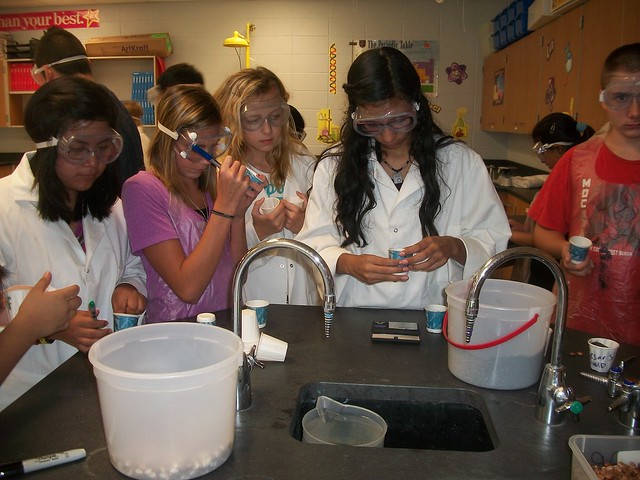
Here are some pictures for the first lab of the 2011-2012 school year for our junior high students. They designed their own experiments. The purpose was for the students to create a step by step procedure for their experiment. As they conducted the experiment the students were to identify missing steps. Today they will reflect on the process to see how they can improve writing the procedures for their next experiment.

Thursday, August 25, 2011

Qualitative and Quantitative Observations


Today the students were given hands-on experience in observation. First they started by identifying all the differences they could find in beans. They used all their senses (except taste) to see if they could group the beans.


Next they were given an analog and a digital scale and they used them to identify the mass of the beans. They looked for reliability between the two types of scales.

Since measurement is an important part of research, this mini-lesson was a good way to reactivate their past learning experiences.

Wednesday, August 24, 2011

Google Apps for Education


Today my 8th grade students logged into their new Google Apps for Education account. They explored sending and receiving emails while a few brave souls checked out Google Calendars.

I spent about 20 minutes giving them an overview of the four major apps they had access to. It will be great for the students to have access to these powerful platforms and I can't wait to see what interesting ideas they come up with.

Tomorrow we begin setting up student blogs. We will be using Blogger as our platform of choice. I expect to see a lot of interesting (i.e. ugly) blogs being created over the next few days. My goal if for the student's first posts to go up on Friday. 

Monday, August 22, 2011

Internet Safety Stories


 Last Friday my 8th grade students wrote internet safety based stories. Today they read them to their peers and decided which story was best. Here is a clip of Glavin reading part of his story.

Friday, August 19, 2011

Activating Prior Knowledge in Science


Today Mr. Mayher (who is co-teaching seventh grade science with me) has been helping the students remember science concepts they have learned in the past. The students were asked to identify as many things as possible from a picture. From there the discussion leads to all the science concepts that were represented in the image.

I was amazed to hear how many connections students made between the image and science concepts. This is a great way to use anticipatory set to reactivate your students memories.

Yesterday I reviewed three different ways students can take notes. They are familiar with the traditional method where the notes are highly structured into an outline. (I like to call this type of note taking as Formal notes.)

I introduced them to Cornell note taking which is still structured, but it adds the use of a graphic organizer which can help many students as well as a place to reflect on the notes. As you know, I believe reflection is the most valuable step in the learning process.

The third note taking strategy is mind mapping (also called webbing). Mind mapping allows visual students to  see connections and relationships. It is also pretty useful for kids that like to draw and make things.


Finally I introduced them to the power of pictures. Marzano identifies drawing pictures as a "powerful way to generate nonlinguistic representations in the mind." Basically, pictures make powerful memories, especially when you draw them yourself.

It is important to point out that there is no reason why a student could not mash-up two or more of these strategies to create a note taking method that works best for them. I would love seeing my students using all of these tools based upon the needs they encounter as they continue to learn throughout the year. 

Saturday, August 13, 2011

Welcome Back!


I am sure some of you have the same attitude about coming back to school as this llama. Days of staying up late and sleeping in, swimming and riding bikes, and lots of free time have come to an end. That doesn't mean you can't have fun here too.

I can't wait to learn with you this year, I hope you feel the same way.